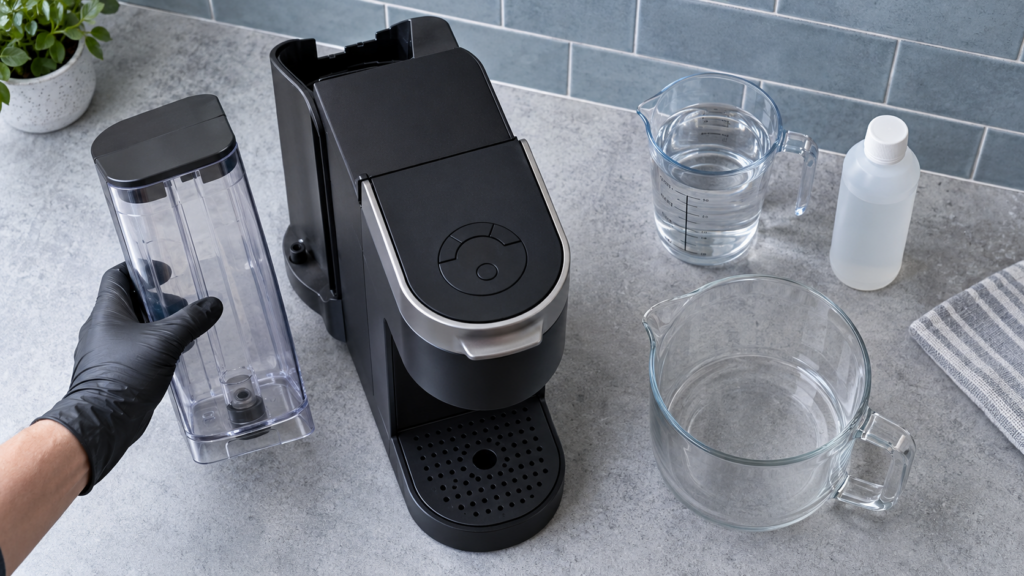
To descale a Keurig K-Supreme, start with the brewer plugged in but powered off, then hold the 8 oz and 12 oz buttons together for three seconds. When the center K button flashes, press it to begin Descale Mode. Continue dispensing the descaling mixture until ADD WATER appears, rinse the reservoir, and run fresh-water rinses until the DESCALE light turns off.
Check the model before starting
This procedure is for the original Keurig K-Supreme with 6, 8, 10 and 12 oz buttons. K-Supreme Plus, K-Supreme SMART, K-Slim and newer Next Gen controls can differ. Check the label under the brewer and visit the K-Supreme model hub if you are unsure.
What you need
- One bottle of Keurig Descaling Solution
- Fresh drinking water
- A large ceramic mug or heat-safe container—never a paper cup
- Access to a sink
- About 20 minutes without interruption
Remove any K-Cup pod before you begin. If a charcoal water-filter cartridge is installed in the reservoir, take the cartridge and holder out for the procedure. Descaling liquid is for the internal water circuit; it should not pass through the filter.
Keurig K-Supreme descaling steps
1. Prepare the brewer
- Lift the handle and remove any pod. Lower the handle.
- Empty the drip tray and water reservoir.
- Remove the water filter and filter holder, if fitted.
- Pour the full bottle of Keurig Descaling Solution into the empty reservoir.
- Fill the empty solution bottle with fresh water and pour that water into the reservoir.
- Place a large ceramic mug on the drip tray.
Caution: Dispensed liquid will be hot and acidic. Keep hands clear of the outlet, do not drink it, and discard each mugful into the sink.
2. Enter Descale Mode
- Leave the brewer plugged in, but make sure it is powered off.
- Press and hold the 8 oz and 12 oz buttons together for three seconds.
- Release both buttons when the center K brew button begins flashing or the brewer indicates Descale Mode.
- Press the flashing K button to start the first descale brew.
If nothing happens, confirm that the machine was off before holding the two size buttons. Pressing the combination while the brewer is already on can select a brew size instead of entering the maintenance program.
3. Run the descaling solution through
- Wait for the dispensing cycle to stop completely.
- Carefully empty the mug into the sink and return it to the drip tray.
- Each time the K button flashes, press it again to run another descale brew.
- Repeat until the ADD WATER indicator illuminates.
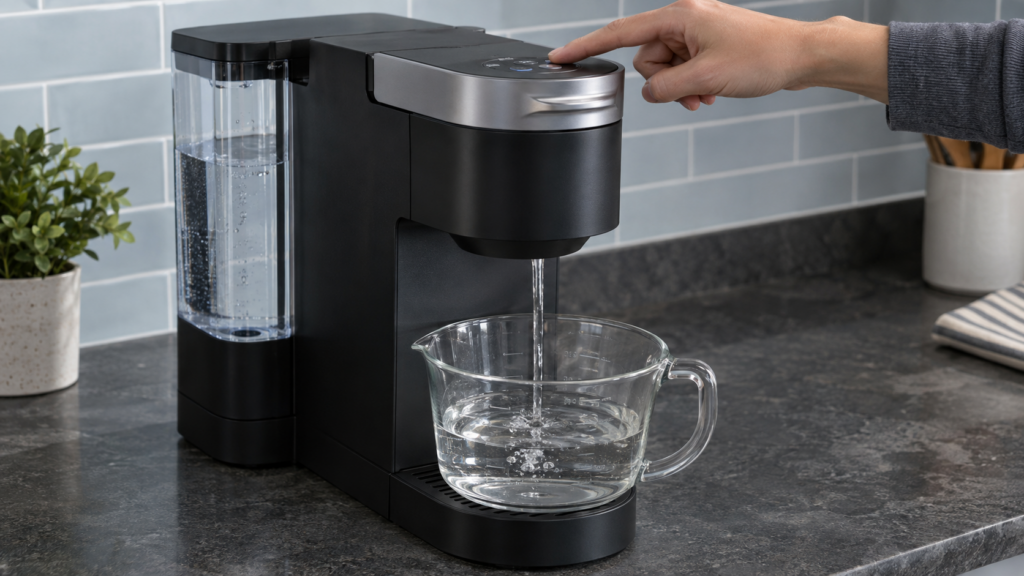
Do not refill the reservoir with more solution during this stage. ADD WATER marks the transition from the solution stage to the fresh-water rinse.
4. Rinse the reservoir
- Remove the reservoir and discard any remaining liquid.
- Rinse the reservoir thoroughly with fresh water. Make sure no descaling-solution scent or foam remains.
- Fill the reservoir to the MAX FILL line with fresh drinking water.
- Reinstall it securely on the brewer.
5. Complete the fresh-water rinse
- Place the empty ceramic mug back beneath the outlet.
- When the K button flashes, press it to run a rinse brew.
- Discard the hot water and repeat each time the K button prompts you.
- Continue until the brewer completes Descale Mode and the DESCALE notification turns off.
The rinse is part of the programmed process. One ordinary water brew is usually not enough to complete the mode, which is why stopping after the first rinse often leaves the descale indicator illuminated.
Quick sequence reference
| Stage | Control or action | End point |
|---|---|---|
| Prepare | Solution bottle plus one bottle of fresh water | Reservoir installed; no pod |
| Enter mode | Brewer off; hold 8 oz + 12 oz for 3 seconds | K button flashes |
| Solution cycle | Press K for each prompted brew | ADD WATER lights |
| Reservoir rinse | Rinse and fill to MAX with fresh water | Reservoir reseated |
| Fresh-water cycle | Press K for each prompted rinse | DESCALE light turns off |
Why the K-Supreme will not enter Descale Mode
- The brewer is powered on. Turn it off while leaving it plugged in, then hold 8 oz and 12 oz.
- The buttons were tapped instead of held. Hold both continuously for a full three seconds.
- The wrong pair was used. On this model, use 8 oz and 12 oz—not STRONG, 6 oz or the center K button.
- The control panel is wet. Unplug the brewer, dry the surface and hands, then retry after reconnecting.
- The exact model differs. Compare the control layout and model label with the original K-Supreme.
If the DESCALE light stays on
The indicator normally clears only after the programmed solution and fresh-water stages are completed. If it remains on, first fill the reservoir to MAX and keep running prompted rinse brews in Descale Mode. Do not try to clear the light by repeatedly unplugging the brewer or running a single ordinary brew.
If the machine exited the mode early, start the model-correct descaling sequence again using fresh water for the rinse portion. Persistent low flow can also prevent the program from completing; inspect the removable reservoir seating and clean the entrance and exit needles only according to Keurig’s care instructions.
Descaling versus needle cleaning
Descaling dissolves mineral deposits in the internal water path. Needle cleaning removes coffee grounds from the pod puncture points. Use the symptom to choose the task:
| Symptom | First maintenance task |
|---|---|
| DESCALE light is on, flow has gradually slowed, or water is hard | Run the complete programmed descale and rinse |
| Grounds in cup, pod area backs up, or brew stops after puncturing | Clean the entrance and exit needles safely |
| No power after maintenance | Stop; do not open the base—use electrical troubleshooting or service |
| Water leaks from inside the housing | Unplug and arrange service |
Common mistakes to avoid
- Leaving a K-Cup pod in the holder during descaling
- Leaving the charcoal filter in the reservoir
- Starting with the brewer powered on
- Stopping when ADD WATER appears instead of beginning the rinse stage
- Running only one fresh-water rinse
- Using a paper cup that can soften or tip under hot liquid
- Substituting vinegar or another cleaner without approval for the exact model
- Forcing water through a brewer that leaks internally or trips power
After descaling
- Wash and rinse the removable reservoir, lid and drip tray.
- Reinstall the water-filter holder with a fresh, prepared cartridge if you use one.
- Run an extra water-only brew if any descaler odor remains.
- Brew one normal pod and confirm full cup volume, normal temperature and no leaks.
Descale when the brewer requests it and sooner if mineral-heavy water causes a noticeable decline in flow. A water filter can improve taste and reduce some impurities, but it does not eliminate the need to descale.
When to stop and call Keurig
Unplug the brewer and arrange support if it loses power during descaling, smells hot or electrical, leaks from the case, repeatedly trips a breaker, or cannot move water after the tank and removable parts are correctly seated. Do not open the base: the K-Supreme contains hot water, sharp needles and mains-voltage components.
Frequently asked questions
Which buttons start K-Supreme Descale Mode?
With the brewer plugged in but powered off, press and hold the 8 oz and 12 oz buttons together for three seconds. Release them when the center K button flashes, then press K to begin.
Should I remove the Keurig water filter before descaling?
Yes. Remove the charcoal filter cartridge and holder from the reservoir before adding descaling solution. Reinstall the holder with a prepared filter after the reservoir has been thoroughly rinsed.
Why does ADD WATER appear during descaling?
It marks the end of the solution stage. Rinse the reservoir, fill it to MAX with fresh water, reinstall it and continue the prompted rinse brews until Descale Mode finishes.
Can I use vinegar in a Keurig K-Supreme?
Keurig’s model instructions specify Keurig Descaling Solution. Using the specified product avoids uncertain concentration, odor and material-compatibility issues. Follow the guide for the exact brewer label.
Official references and verification
Last verified: September 13, 2026. Keurig has several similarly named K-Supreme models. Always prioritize the Use & Care Guide that matches the model number printed on your brewer.
Find more model-specific help on the Keurig troubleshooting hub or browse all CoffeeFixGuide repair guides.