Quick answer: On a De’Longhi Magnifica Evo, a blinking descale indicator during the programmed cycle is normal. If the machine asks for another rinse, fill the tank with fresh water to MAX and complete that rinse. If the cycle has actually finished and the warning remains, De’Longhi advises checking that the water-tank float is present and repeating the complete programmed descaling sequence with water only, filling the tank to MAX for the last two rinses. Do not try to clear the reminder by unplugging the machine or running an ordinary hot-water dispense.
Find the complete ECAM29X code and revision on the rating label or manual before following button prompts. The stage indicators below are verified against De’Longhi’s ECAM29X.6Y / ECAM29X.8Y EX:2 instructions. Other Magnifica Evo panels, including ECAM29X.2Y and .3Y, use their own Quick Guides. The recovery principle is supported by De’Longhi’s broader descale-light FAQ, but the controls on your machine may differ. See the Magnifica Evo model page for related faults.
First identify when the indicator stays on
| What you see | What it usually means | Next action |
|---|---|---|
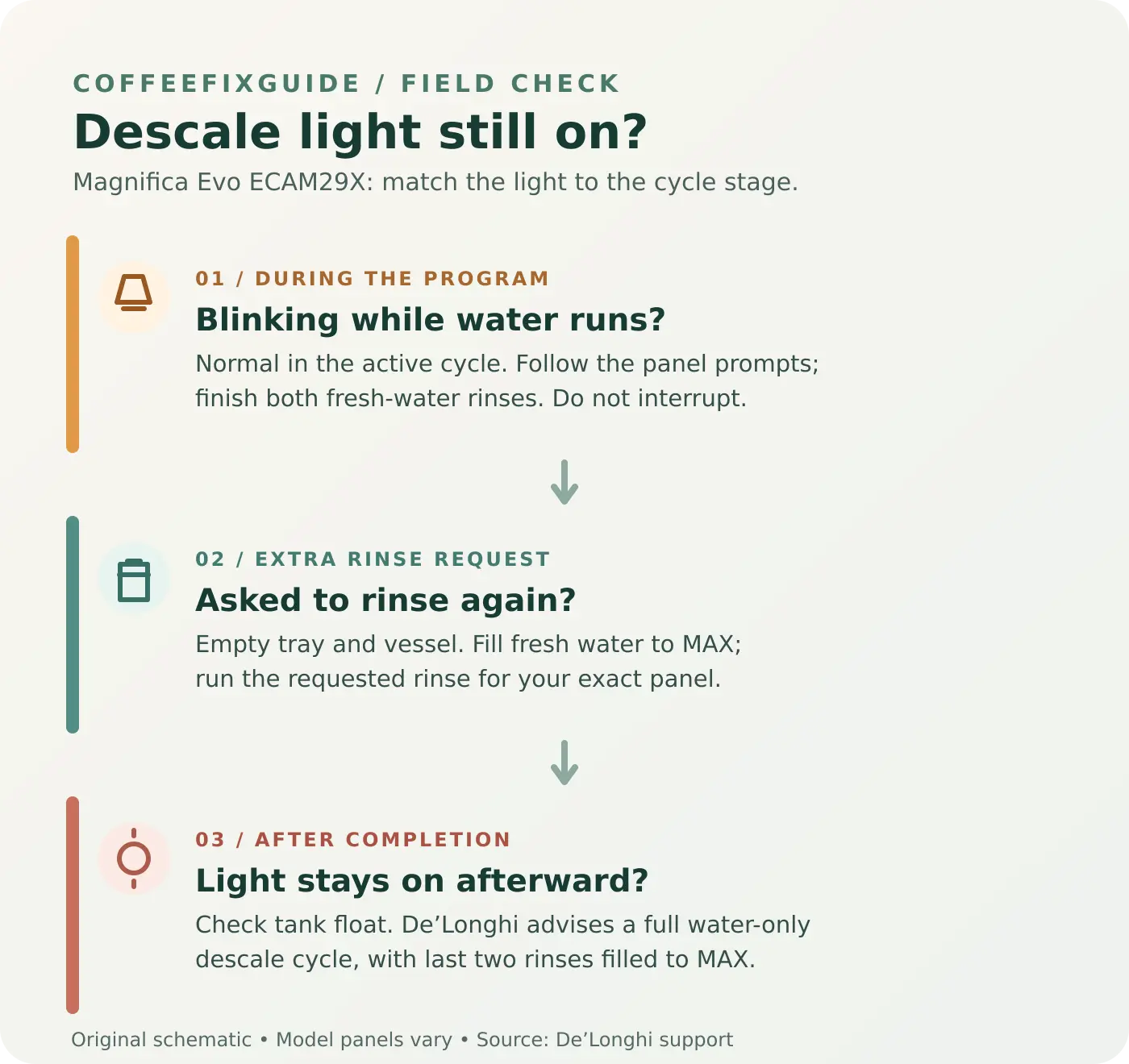
| Descale light blinks while the cycle is dispensing or paused | The programmed cycle is still running. Automatic pauses are expected. | Follow the prompted stage and continue through all rinses. |
| Another rinse is requested after the expected rinses | A rinse tank may not have reached the MAX mark. | Empty the drip tray and vessel, fill fresh water to MAX and complete the requested rinse. |
| The machine has reached its normal completion stage, yet the light remains on later | The prior program may not have been registered as complete; a water-level detection problem is also possible. | Check the tank float and follow De’Longhi’s water-only repeat advice below. |
Finish an active program before trying to reset anything
On the EX:2 sequence, the descale indicator blinks throughout the programmed process. The machine first runs the descaling solution and then requests two separate fresh-water rinses. Fill the tank to MAX for each rinse. The medium-intensity indicator identifies the first rinse; the strong-intensity indicator identifies the second. After correct completion, the pre-ground indicator lights, followed by prompts to empty the grounds container and refill the water tank. That is a better completion check than counting minutes alone.
If you are still in the program, continue from the panel’s current prompt using the complete Magnifica Evo descaling instructions. Do not turn the machine off to force the light out; De’Longhi says a started cycle must be concluded with the full rinse. Never add another dose of descaler just because the indicator is blinking during an active rinse.
If it asks for a third rinse
- Empty the collection container and drip tray so they will not overflow.
- Fill the water tank with fresh drinking water to the marked MAX line, not merely above the low-water threshold. Seat the tank fully.
- Place the collection container under the outlets and run the additional rinse indicated by your model’s panel or Quick Guide. For the EX:2 procedure, this repeats the second-rinse stage.
- Let the machine finish, then empty the tray and grounds container and refill the water tank when prompted.
De’Longhi specifically links this extra rinse to a tank that was below MAX during the earlier rinses. The request helps clear residual descaling solution from the internal circuit. A small amount of rinse water in the grounds container after descaling can be normal.
If the completed machine still asks for descaling
Only use this path when the previous program truly ended and the machine is ready to start a new cycle. De’Longhi’s general FAQ gives these checks:
- Look at the removed tank. Check that its black movable float is present. You can inspect it visually without taking the tank apart. If it is missing or damaged, contact De’Longhi support for the correct tank or service advice; do not jam the float or defeat a sensor.
- Start a new programmed descaling cycle using water only. Follow the exact button sequence in the manual for your full ECAM29X code. Do not put more descaling chemical in for this recovery cycle.
- Complete every stage. Supply fresh water as prompted and fill the tank to MAX for the last two rinses. Keep the catch vessel in place and do not interrupt the program.
- Confirm the completion signal. On the EX:2 panel, the pre-ground indicator marks successful termination; finish the subsequent tray and tank prompts too. If the warning persists after a correct full cycle, seek manufacturer support.
Check the water-hardness setting after the warning is resolved if the reminder reappears sooner than expected. The setting affects how often maintenance is requested; changing it is not a substitute for finishing the program. If the tank or float cannot be detected, the machine may need a correctly matched replacement or service, but the light alone does not prove a failed sensor or control board.
Supplies, safety and when to stop
- For an ongoing normal descale: fresh water, a vessel of at least 2 litres, and the correct model-specific instructions. The original EX:2 descale stage uses 100 ml of De’Longhi descaler with 1 litre of water; the recovery cycle above uses water only.
- For an extra rinse: only fresh water filled to MAX. You do not need a new chemical dose or replacement part.
- Handling: hot liquid may leave the coffee and water spouts. Keep hands clear, empty the catch vessel carefully and wipe up any descaler spill promptly.
- Stop and contact service: if a full tank is not recognized, no water flows despite the tank and spout being properly seated, the machine leaks, or an electrical or burning smell appears. Do not repeatedly run the pump dry or open the appliance to probe live components.
Frequently asked questions
Why is the descale light flashing after I added clean water?
On the EX:2 panel it continues flashing during the programmed rinse stages. Refill to MAX and follow the next prompt; the light does not clear merely because fresh water was added.
Will unplugging a Magnifica Evo turn off the descale warning?
Unplugging does not complete the descaling program. Identify the current stage and finish the requested rinses. If a completed program still leaves the warning, use De’Longhi’s water-only recovery guidance above.
Why does the machine want a third rinse?
De’Longhi says this can happen when the tank was not filled to MAX during the first two rinses. Empty the drip tray, fill to MAX and run the extra rinse indicated by the exact model’s panel.
Is the water-tank float a part I should replace?
Only if it is visibly missing or damaged and De’Longhi confirms the proper tank or part for your full model code. Do not buy an internal sensor based solely on a persistent reminder.
Official sources and related guides
- De’Longhi: Magnifica Evo descaling and cleaning, including ECAM29X.6Y / .8Y EX:2 stages
- De’Longhi: descale light remains on after descaling
- De’Longhi: additional rinse on ECAM29X.2Y / .3Y
- Complete Magnifica Evo descaling guide · Warning and error lights · No coffee coming out
Instructions checked against De’Longhi support on September 27, 2026. Cover: original illustrative image of a generic unbranded machine, not the actual Magnifica Evo control panel. Diagnostic diagram: original CoffeeFixGuide artwork.