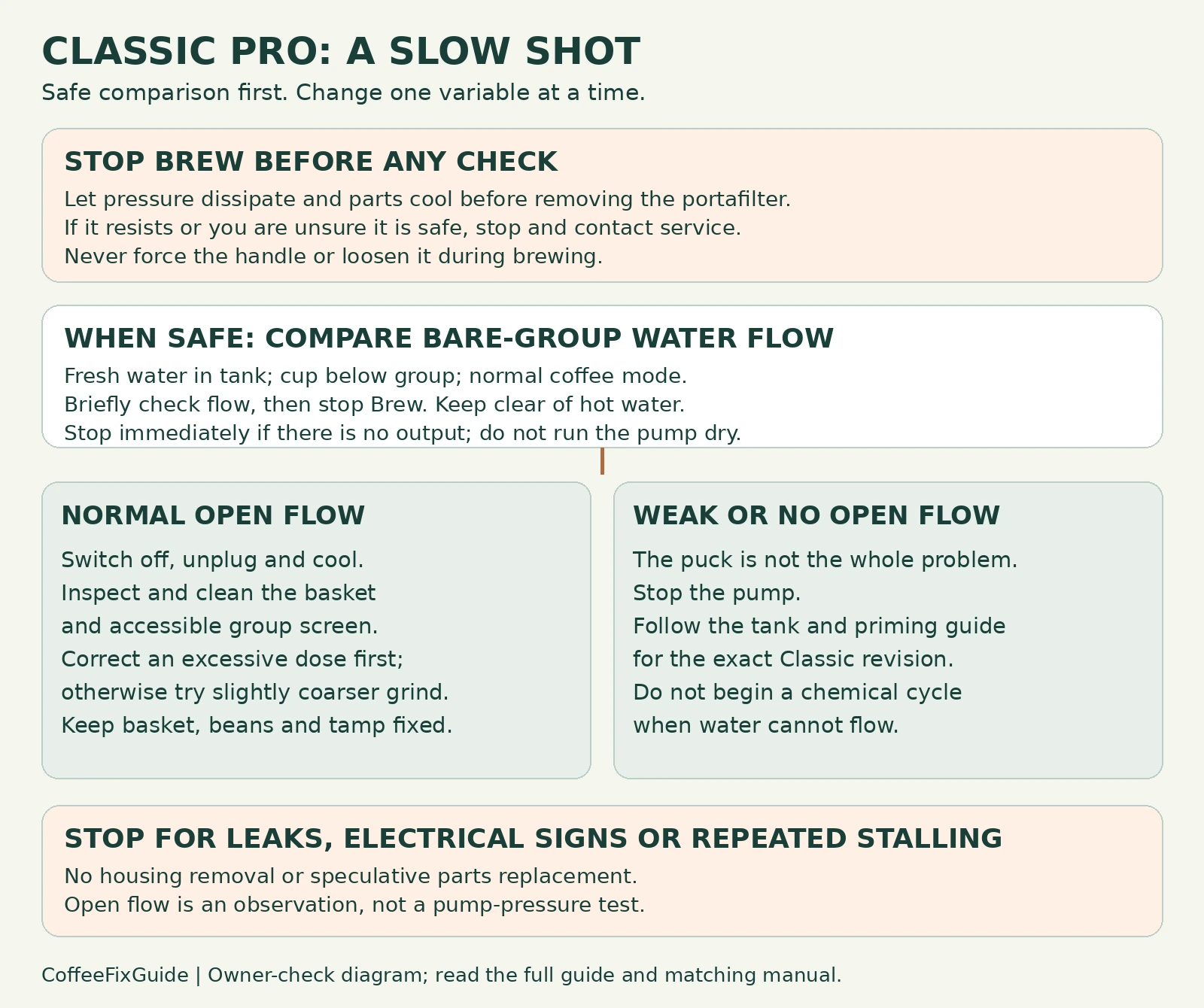
If a Classic Pro shot has stalled, switch Brew off first. Do not loosen the portafilter while it is under pressure. Let the machine cool and the pressure dissipate before removal. If the handle remains unusually resistant or you cannot establish that it is safe to remove, stop and seek service—do not force it. Once safe, compare a brief water-only test at the bare group with the next coffee shot.
If water flows normally from the bare group but the shot barely drips, investigate the basket and coffee preparation first. If the bare group also has weak or no flow, changing the grind will not resolve the whole problem.
Check the machine and basket you actually have
This guide follows Gaggia’s U.S. Classic Pro manual. Check your model label and instructions before applying it to another Classic revision or an E24. The supplied traditional and pressurized basket arrangements are not interchangeable: keep the matching components required by your manual. Do not judge all baskets by the same flow rate or dose.
Have a heat-safe cup, soft brush and your usual dose measure ready. Keep hands clear of hot outlets, never run the pump against an empty tank and do not open the housing or adjust pump pressure for this symptom.
1. Separate machine flow from coffee resistance
After safely removing the portafilter, check that the tank contains fresh cold water. Put a cup under the group, use normal coffee mode with the steam knob closed, and briefly press Brew. Switch Brew off as soon as the result is clear. Do not keep a noisy pump running without water output.
| Result | What it tells you | Next step |
|---|---|---|
| A stream starts from the bare group | The basket and puck are absent from this test; the coffee preparation path deserves attention next. | Inspect the cooled basket and visible group screen, then test one recipe change. |
| The bare group only drips or stays dry | The coffee puck cannot explain all of the restriction. | Stop the pump and use the tank and priming diagnosis after observing the safety precautions above. |
| Water leaks around the portafilter during a shot | This is not simply a grind-speed symptom. | Stop brewing; use the model’s leak diagnosis before another shot. |
This comparison is an editorial diagnostic check, not a measured pump-pressure test. Normal-looking open flow does not prove every internal component is healthy.
2. Check the basket and accessible screen
Switch off, unplug and let the parts cool before touching them. Inspect the basket for coffee blocking its holes, and brush visible grounds from the group screen. Follow the basket and screen cleaning routine; do not enlarge holes with a metal tool or dismantle the group for this check.
Reassemble correctly before reconnecting power. If cleaning restores a normal shot using the same coffee and dose, residue was a useful finding. If only a coffee-filled basket still chokes, move to grind and dose.
3. Change one preparation variable
Use the same beans and basket. If the basket is overfilled for its specified capacity, correct that first. Otherwise, move the grinder a little coarser for the next shot while keeping the dose and tamp consistent. Follow the grinder’s own adjustment instructions. Record the old setting so you can reverse the change.
If the next shot flows more freely, preparation resistance was contributing. Judge the result by flavor as well as flow. If it still stalls, stop the shot and repeat the pressure precautions before removing the portafilter; do not keep cycling the pump against a choked puck. Persistent trouble with a clean basket and a reasonable recipe needs further model-specific assessment.
When maintenance or service is the next step
Use the Classic Pro descaling procedure only when applicable to your revision and maintenance state. A machine that cannot move water needs a flow diagnosis before a chemical cycle. Stop for internal leakage, a burning smell, power trips, continuing no-flow pump noise or a portafilter that will not release normally. None of those symptoms proves which part to buy.
FAQ
Should I tamp harder to make it flow?
No. Gaggia lists excessively fine or firmly packed coffee among brewing restrictions. Keep tamp consistent so that a grind or dose change can be evaluated.
Does slow espresso mean the pump pressure is low?
No. A restrictive puck can produce very little flow even while the pump is working. These external checks do not measure pressure.
Source
Gaggia Classic Pro U.S. instruction manual: preparation, filter arrangements, cleaning and “In case of malfunction.” The manufacturer lists preparation and cleaning checks; the comparison branches above organize those checks without claiming a confirmed component diagnosis.