Cover image: representative illustration only. It does not show the exact model, control layout, or a procedure to copy. Use the model-specific instructions and diagrams below.
If the Keurig K-Supreme descale light will not turn off, the brewer usually has not registered a complete Descale Mode cycle. Ordinary water brews and unplugging do not clear the notification. Enter the programmed mode with the brewer off, then continue fresh-water rinse brews until the DESCALE light switches off by itself.
Applies to the original K-Supreme
This guide covers the original Keurig K-Supreme with 6, 8, 10 and 12 oz controls. K-Supreme Plus, SMART, K-Slim and Next Gen models may use a different sequence. Confirm the label and layout on the K-Supreme model page first.
The fix in one minute
- Remove any K-Cup pod and place a large ceramic mug below the outlet.
- Leave the brewer plugged in but turn its power off.
- Hold 8 oz + 12 oz together for three seconds.
- When the BREW button flashes, press it to start.
- If you already completed the solution stage, use a thoroughly rinsed reservoir filled to MAX with fresh water.
- Empty the hot water after each brew and press BREW whenever it flashes again.
- Stop only when the DESCALE notification turns off automatically.
If you cleaned the brewer without entering Descale Mode, the water path may be cleaner but the controller never received the completed maintenance sequence. Run the correct programmed procedure rather than looking for a separate light-reset button.
Why the descale light stays on
| What happened | Why the light remains | Correct next step |
|---|---|---|
| Solution and water ran as normal brews | Descale Mode was never activated | Start with power off; hold 8 oz + 12 oz for 3 seconds |
| You stopped at ADD WATER | That signal begins the rinse stage | Rinse and fill the tank, then continue prompted brews |
| You ran only one rinse | The programmed rinse is incomplete | Continue until DESCALE turns off by itself |
| Flow stopped or only air came out | Heavy scale may be restricting water flow | Use the official fresh-water recovery below |
| The tank was not seated | The brewer cannot finish without a reliable water supply | Refill to MAX and reinstall the reservoir firmly |
| You unplugged the brewer | Power cycling does not record completion | Re-enter the mode and finish all rinse prompts |
| The controls belong to another model | The button combination may be wrong | Check the model number underneath the brewer |
Fix 1: make sure Descale Mode actually starts
If you have not completed the full cleaning cycle yet, start with our step-by-step Keurig K-Supreme descaling guide, then return here if the light stays on after the fresh-water rinse.
The K-Supreme must be plugged in and powered off before the button combination is pressed. That detail is easy to miss.
- Turn the brewer off without unplugging it.
- Confirm that no pod is installed.
- Hold both the 8 oz and 12 oz buttons continuously for three seconds.
- Release them when the BREW control flashes, then press BREW once.
If the cup-size buttons only select a normal brew, power the machine off and retry. Do not include the center button in the three-second combination.
Fix 2: complete every fresh-water rinse
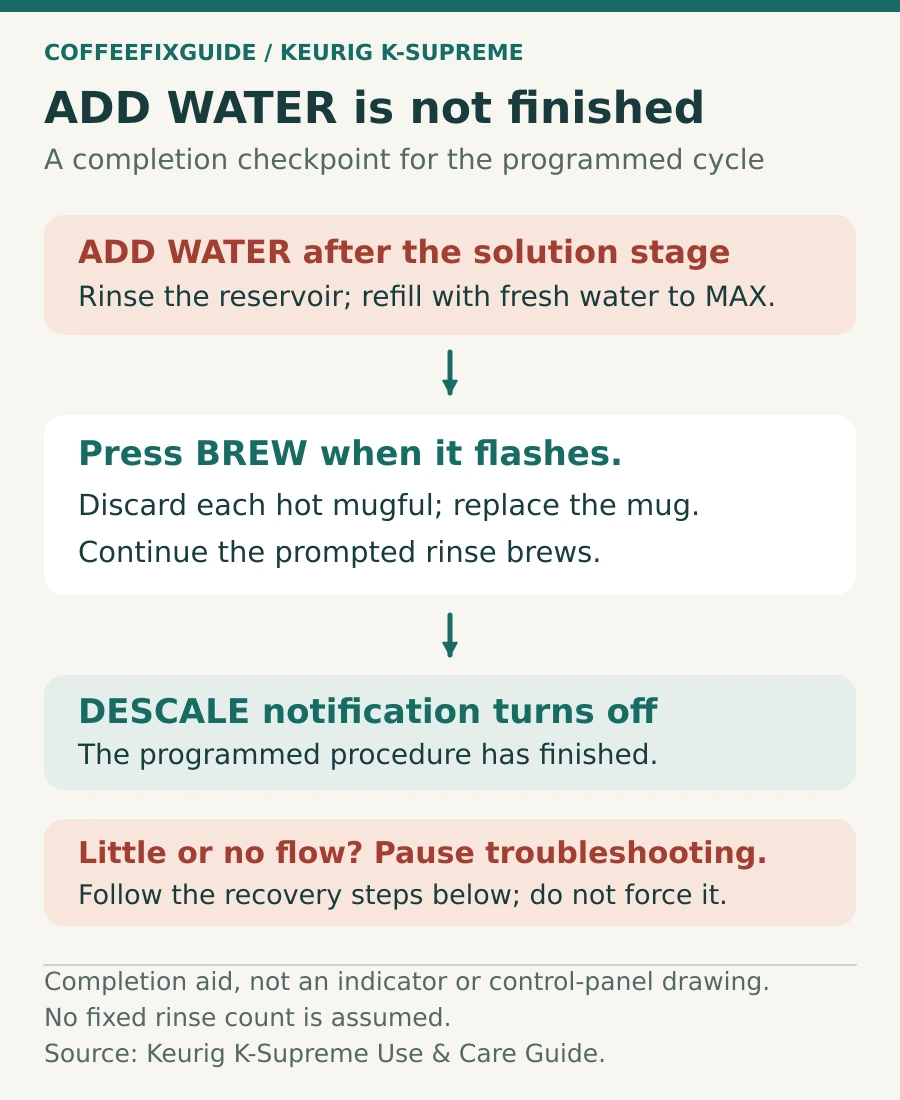
ADD WATER is the midpoint, not the finish. When it appears, discard any remaining mixture, rinse the reservoir thoroughly, fill it to MAX with fresh water and reinstall it. Press BREW each time the control flashes, emptying the mug between cycles. Continue until the DESCALE light turns off.
Use a large ceramic mug, not a paper cup. The rinse water can be hot. Keep hands clear of the outlet and discard every mugful safely.
Fix 3: recover from little water or an air-blowing sound
Keurig’s K-Supreme guide explains that descaling solution can foam as it reacts with mineral scale. In a heavily scaled brewer, that reaction may be followed by little or no output and the sound of air moving through the system.
- Turn the brewer off and unplug it.
- If solution remains in the reservoir, discard it.
- Rinse the reservoir thoroughly and fill it with fresh water.
- Reconnect power, turn the brewer on and repeat the fresh-water rinse stage.
- If flow still does not recover, leave the brewer unplugged for at least 30 minutes, then continue the rinse.
Do not keep feeding concentrated descaler into a brewer that is moving no water. The immediate goal is to restore fresh-water flow and remove the remaining solution.
Fix 4: reseat and refill the reservoir
- Fill to the MAX FILL line for the programmed rinse.
- Lower the reservoir straight onto its base and confirm the locating tabs engage.
- Use fresh drinking water; the guide advises against distilled water.
- Remove the charcoal filter and holder during descaling, then reinstall a prepared filter afterward.
If ADD WATER stays on with a full, correctly seated tank, inspect the tank outlet and receiving area for visible debris. Do not push tools into the valve or dismantle the brewer.
Fix 5: use the correct sequence for your exact model
Keurig reuses the “Supreme” name across several generations. A procedure copied from a K-Supreme Plus SMART, K-Slim or newer model can leave the original K-Supreme in normal brew mode. Match these identifiers before retrying:
- Model name and number on the underside label
- Presence and position of 6, 8, 10 and 12 oz buttons
- Separate power and BREW controls
- Exact wording in the Use & Care Guide supplied for that model
What will not reset the descale light
- Unplugging the brewer for a few seconds
- Running one ordinary water-only brew
- Holding only the power or BREW button
- Cleaning the pod needles without completing Descale Mode
- Adding more solution after the ADD WATER stage
- Stopping the fresh-water rinse because the first mug looks clear
Descale light versus a real flow fault
| Test result | Most likely situation | Next action |
|---|---|---|
| Full rinse brews dispense and the light eventually clears | Incomplete maintenance cycle | No repair needed |
| Only a partial cup after one full descale | Scale or needle restriction may remain | Clean accessible needles and repeat the official descale once |
| Partial cup remains after two descale procedures | Fault beyond routine maintenance | Contact Keurig customer service |
| No power after descaling | Electrical or thermal fault is possible | Unplug; do not open the base |
| Water leaks from inside the case | Internal hose, seal or valve issue | Stop use and arrange service |
When to stop troubleshooting
Contact Keurig if the K-Supreme still brews only a partial cup after two correctly completed descale procedures, if the controls cannot enter Descale Mode, or if the brewer has no power, an electrical smell, an internal leak or repeated shutdowns. Keurig describes the machine as not user-serviceable beyond its recommended cleaning and maintenance procedures.
Frequently asked questions
Is there a separate K-Supreme descale-light reset button?
No. On the original K-Supreme, the notification clears when the full programmed descaling and fresh-water rinse procedure finishes.
Why is the light still on after I ran descaling solution?
You may have used normal brew cycles or stopped at ADD WATER. Enter Descale Mode with the brewer off by holding 8 oz and 12 oz for three seconds, then complete every prompted rinse.
How many rinses does the K-Supreme need?
Use the notification rather than a fixed guess. Refill the reservoir to MAX and repeat the prompted fresh-water brew until the DESCALE light turns off automatically.
What if the brewer blows air and dispenses almost nothing?
Unplug it, discard any remaining solution, rinse and fill the tank with fresh water, then repeat the rinse stage. If flow does not recover, Keurig advises leaving the brewer unplugged for at least 30 minutes before continuing.
Official references and verification
Last verified: September 13, 2026. Control sequences differ across similarly named Keurig models; follow the guide tied to the model number printed on your brewer.
For more model-specific help, browse the Keurig troubleshooting hub or see all CoffeeFixGuide repair guides.