Quick answer: If your Breville Barista Express BES870 shows no lights when you press POWER, first rule out an inactive outlet and a loose plug. Do this only with a dry, undamaged cord and work area. If the outlet works and the machine stays completely dark, stop there and arrange service; a symptom cannot tell you which internal electrical part failed. If the machine was running and then stopped, Breville gives a different check: switch it off, unplug it, allow 30–60 minutes to cool, and contact support if the problem persists. A flashing light means the machine has power and belongs to a different diagnostic path.
These checks apply to the Barista Express BES870 family, including the common US BES870XL marking. Confirm your full rating-label code and region. The safety steps and cool-down guidance below come from the Breville BES870 US/Canada/Mexico instruction book. The outlet and symptom-separation checks are editorial steps; they do not diagnose an internal board, switch or fuse. The cover image is an illustrative machine, not a picture of your exact control panel.
First: was it dark from the start or did it stop?
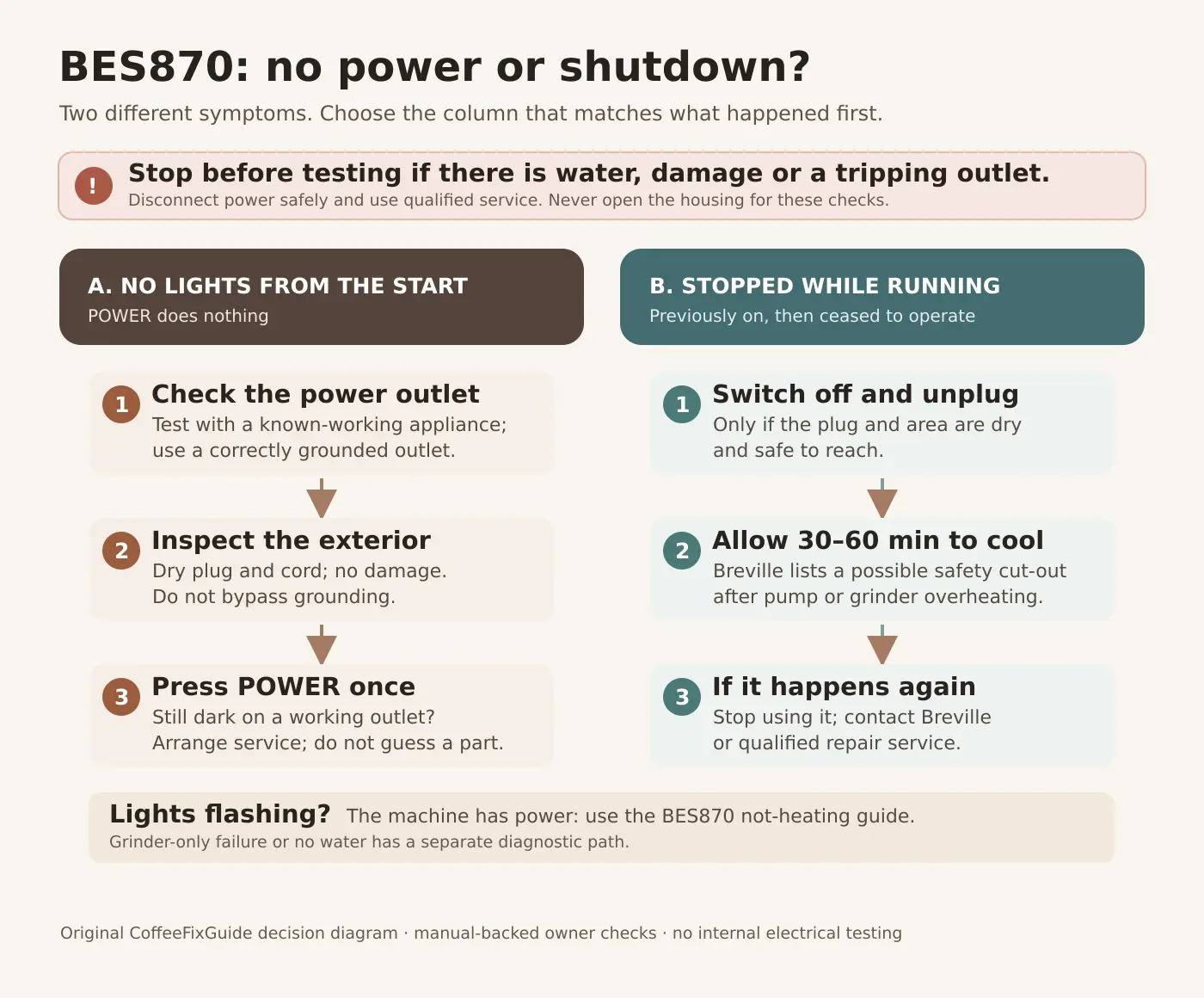
Stop point: Do not do another plug-in test if the socket or cord is wet, the plug is hot, there is a burning smell, visible damage, smoke, or the breaker/GFCI trips again. Isolate power safely and seek an electrician or qualified appliance service as appropriate. Breville says to stop using a machine with a damaged cord, plug or appliance. Do not remove the third grounding prong, defeat a safety cut-out, open the case or touch internal wiring.
What you need
- Your exact model label and regional manual.
- A dry, known working, appropriately grounded wall outlet, if the machine and surroundings are safe to handle.
- A second ordinary appliance for checking whether the outlet has power.
- A note of whether the machine was completely dark, went off during grinding or brewing, or showed flashing lights. No screwdrivers or multimeters are needed for the owner checks below.
1. Completely dark before it ever starts
- Look before touching: check for spilled water around the machine and outlet, a crushed or damaged cord, discoloration or a loose socket. Stop if any of these is present.
- Verify the outlet: in a dry, safe setup, unplug the machine and test that outlet with another known working appliance. If the outlet has no power, solve the outlet issue separately. Do not repeatedly reset a breaker that trips.
- Reconnect normally: if the outlet works, the plug and cord are sound, and your outlet matches the machine’s regional electrical requirements, connect the BES870 directly and press POWER once. Breville’s setup directions say the POWER light should flash while heating, then become steady at operating temperature.
- Still no lights: record the model code and arrange Breville support or a qualified repair assessment. Do not buy a control board, switch, fuse or thermocoil based on a dark panel alone.
A water tank or bean hopper issue does not prove an electrical failure. Breville notes that an incorrectly locked hopper causes the FILTER SIZE LEDs to flash during setup; lights flashing are evidence of a different symptom, not the “no lights” case. If buttons light but no water flows, use the no-water guide.
2. Previously running, then stopped
Breville’s troubleshooting table calls this “Machine is on but ceases to operate.” It says a safety thermal cut-out may activate after pump or grinder overheating. Press POWER to switch off, unplug from a safe, dry outlet, and let the machine cool for roughly 30–60 minutes. If the same shutdown returns after normal operation, contact Breville Consumer Support. A cool-down is the manufacturer’s first check for this specific symptom, not proof that the cut-out is the failed component.
Do not keep running repeated brews or grind cycles to make it fail again. If you noticed smoke, burning odor, a leak or a tripping outlet, do not reconnect at all. If the grinder alone stopped but the machine’s buttons stay lit, follow the grinder diagnostic instead.
3. Lights are flashing: the machine is receiving power
The BES870’s POWER light flashes during normal warm-up. The manual also describes a slow POWER flash in sleep mode after one hour of inactivity and auto-off after three hours. Read the display and dial position before calling a normal startup “no power.” If the STEAM/HOT WATER light flashes at switch-on and the machine will not heat normally, check that the dial is fully at STANDBY. Our separate BES870 not-heating guide explains these light patterns and cold-coffee checks.
If a leak followed cleaning or descaling, make sure the machine, plug and outlet are dry before any ordinary restart. Water near the electrical base is a service stop point; use the leak-location guide for external checks only.
What a repairer may need to confirm
| Observation | Owner’s safe next step | What it does not prove |
|---|---|---|
| Outlet works; machine remains dark | Stop and request an electrical diagnosis. | Which internal part has failed. |
| Machine stops after running | Use Breville’s 30–60 minute cool-down once; seek help if it recurs. | That a cut-out must be replaced. |
| POWER or STEAM light flashes | Read the matching warm-up or dial instructions. | That the machine has no power. |
Diagnosis and labor may cost more than an individual component. Ask for a written estimate before approving an internal repair, then use our repair or replace calculator for a second opinion on the economics. For any replacement, confirm the full model and revision through Breville; the parts register does not certify an internal electrical part from symptoms alone. We do not assign a numerical likelihood to any failure without repair records.
FAQ
Should I press a hidden reset button?
The cited owner manual gives no general owner reset procedure for a completely dark BES870. Do not bypass its electrical protection. If it stopped during operation, use the manual’s off–unplug–cool step; persistent failure belongs with service.
Is a flashing POWER light the same as a dead machine?
No. Breville says it flashes during heating and slowly during sleep. If a light is visible, follow the startup and heating diagnostic rather than ordering power parts.
What if it went off after grinding?
Breville lists possible pump or grinder overheating in the “machine is on but ceases to operate” entry. Switch off, unplug safely and allow 30–60 minutes to cool. If it stops again, contact support; the cause still requires diagnosis.
References and related guides: Breville BES870 USCM instruction book (Safety, First Use, Sleep & Auto Off, Troubleshooting; checked 27 September 2026) and Breville’s BES870 support hub. Find the machine in the Barista Express model directory, or read how we separate observations from diagnoses. Follow your exact regional manual if its controls or safety instructions differ.