Quick answer: If your Nespresso Vertuo Next has no light, press the button or unlock the head to wake it; the machine normally switches off after about two minutes. If it stays dark, check the plug, a known-working outlet, and the household fuse or breaker. If the light comes on but coffee does not flow, the machine has power: check the locked head, capsule, and water tank instead. Blinking is a separate diagnostic path.
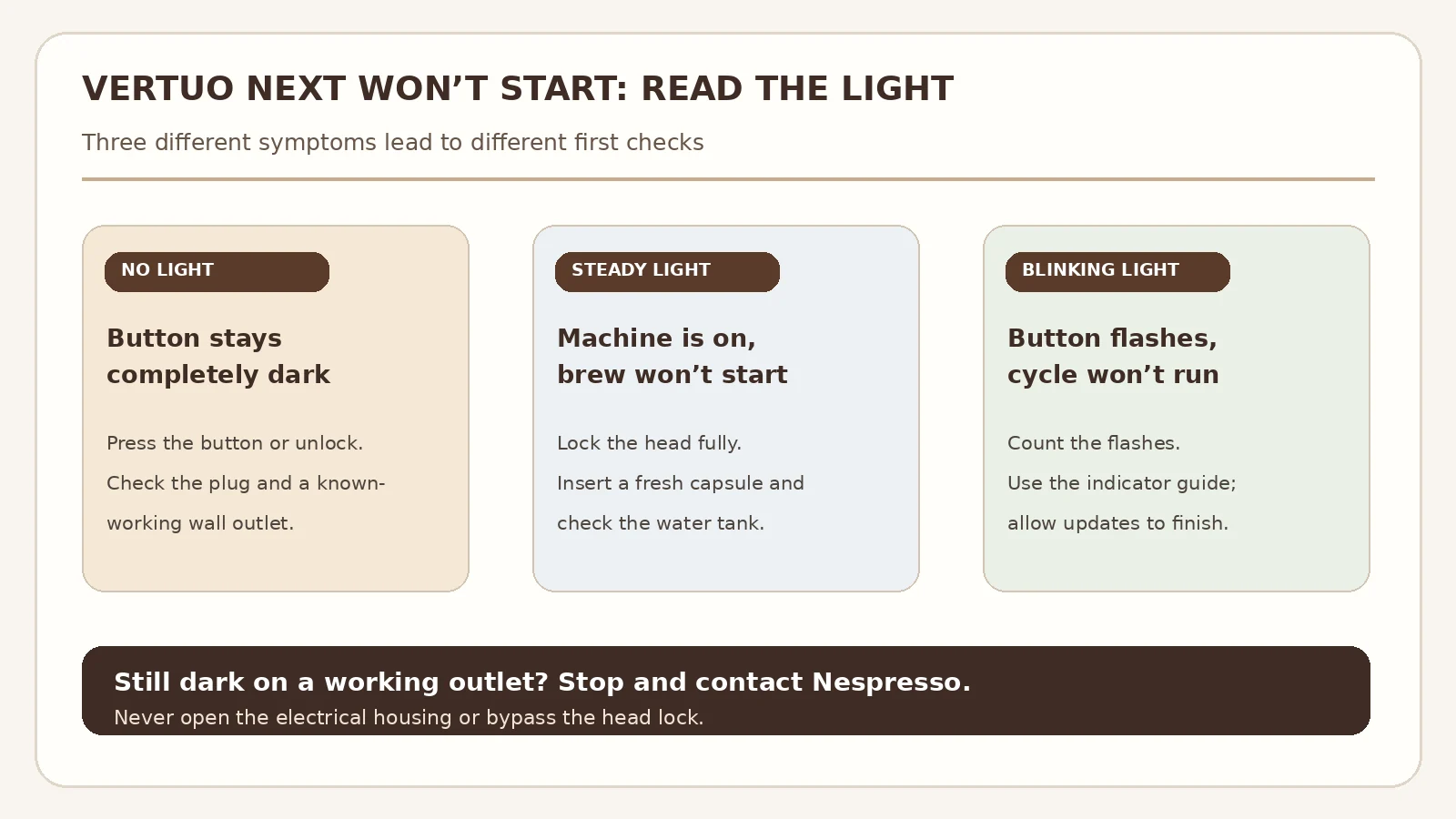
Use the button state as your starting point. The Vertuo Next manual gives different checks for a dark button, a steady light with no coffee, and blinking during operation. The cover image is a generic editorial illustration; the diagram below shows the troubleshooting paths rather than an exact control-panel rendering.
First, identify the symptom
| What you see | What to check first | Where to go next |
|---|---|---|
| No light, even after pressing the button | Wake the machine; then verify plug and outlet | Power checks below |
| Steady light, but no coffee | Head lock, fresh capsule, water tank | No-water guide if water still does not move |
| Light blinking | Observe the blink pattern and operating state | Indicator troubleshooting |
No light: check the simple power causes
- Try waking it. Press the coffee button once. If nothing happens, unlock the head and try again. Automatic power-off after roughly two minutes is normal, so a dark button after a pause does not by itself mean the machine has failed.
- Check the external connection. With dry hands, make sure the plug is fully seated. Test the outlet with a small device you know works, then reconnect the machine directly to an appropriate outlet. If a switched outlet or power strip is involved, check its switch. Do not use a damaged cord or plug.
- Check the household supply. If the outlet is dead, inspect the relevant breaker or fuse according to your home’s normal electrical safety procedure. If it trips again, stop and have the outlet or circuit checked. Do not repeatedly reset a tripping breaker to keep testing the machine.
- Look for a response. A light now means you have moved past the no-power branch. If the button remains completely dark on a verified live outlet, stop here and contact Nespresso support or a qualified repair service. The user-level manual does not provide a safe internal electrical test for this symptom.
Safety: Unplug the machine and stop using it if the cord, plug, or housing is damaged, the outlet is hot, there is a burning smell, or liquid has reached electrical parts. Do not open the casing or probe live components for this check.
Steady light but no brew: check the brewing conditions
A steady light means the initial power check has passed. Close and lock the head fully; the lever should reach its locked position. Open it again to eject an old capsule, then insert a fresh, undamaged Vertuo capsule in the correct position. Fill and seat the water tank. Close and lock the head and press the button once.
If the head is locked and the tank is full but the machine still makes no coffee, watch what it does next. A hum with no water output belongs in our Vertuo Next water-flow diagnosis. Water under the machine belongs in the leak guide. These observations narrow the fault more reliably than repeating the start button.
Blinking: read the sequence before changing settings
Blinking can indicate a normal process or a condition that needs attention. Allow a short pre-wetting and barcode-reading phase after pressing the button. If the machine has been used heavily, the manual advises switching it off by holding the button for three seconds, turning it on again, and allowing about 20 minutes for cooling when needed.
- One blink, then a pause: check the water tank and confirm the head is locked.
- Two blinks, then a pause: check that a fresh, undamaged capsule is correctly placed; lock the head and fill the tank. If the condition persists, eject and replace the capsule, unplug for ten seconds, reconnect, and retry as the manual directs.
- Persistent blinking after setup or app connection: a firmware update can take time. Follow Nespresso’s current machine assistance instructions before interrupting it repeatedly.
See the Vertuo Next blinking-light guide for the longer indicator path. If the machine is in a descaling cycle, use the descaling guide to complete or exit it correctly. A factory reset is not a first step for a machine with no light.
Tools, parts, and when to call service
For the checks above you need only a known-working small electrical device to verify the outlet, fresh water, and a fresh compatible Vertuo capsule. You should not need screwdrivers, a multimeter, or replacement parts. Do not buy a pump, control board, or power component based only on a dark button or a failed first brew attempt.
Call Nespresso or a qualified technician if a known-working outlet produces no response, the breaker trips when the machine is connected, there are signs of heat or electrical damage, or the manual’s capsule-and-water checks do not clear a repeating error sequence. Have the model and serial number ready; they help support identify the correct version and service options.
FAQ
Why is my Vertuo Next completely dark after I made coffee?
It may simply have powered itself off. Press the button or unlock the head to wake it. If there is still no light, check the plug and outlet before considering a machine fault.
Does a steady white light mean the pump is broken?
No. A steady light with no brew can result from an unlocked head, capsule placement, or an empty or poorly seated tank. Test those conditions before investigating water flow.
Should I run descaling if the button does not light?
No. Descaling requires an operating machine and addresses mineral buildup in the water path, not loss of electrical power. First follow the no-light steps above.
Can I use a capsule from another Nespresso system?
Use a capsule compatible with the Vertuo system. The manual calls for a fresh, undamaged capsule in the correct position when diagnosing a failed brewing attempt.
Sources and scope
This guide follows the Nespresso Vertuo Next user manual troubleshooting table and Nespresso US support FAQ, checked October 9, 2026. Indicator descriptions are grouped by observed behavior because firmware state and operating mode can change what a blinking light means. Follow the instructions supplied with your specific machine if they differ.