Cover image: representative equipment, not an exact model or control-layout reference. Use the model-specific instructions below for checks and adjustments.
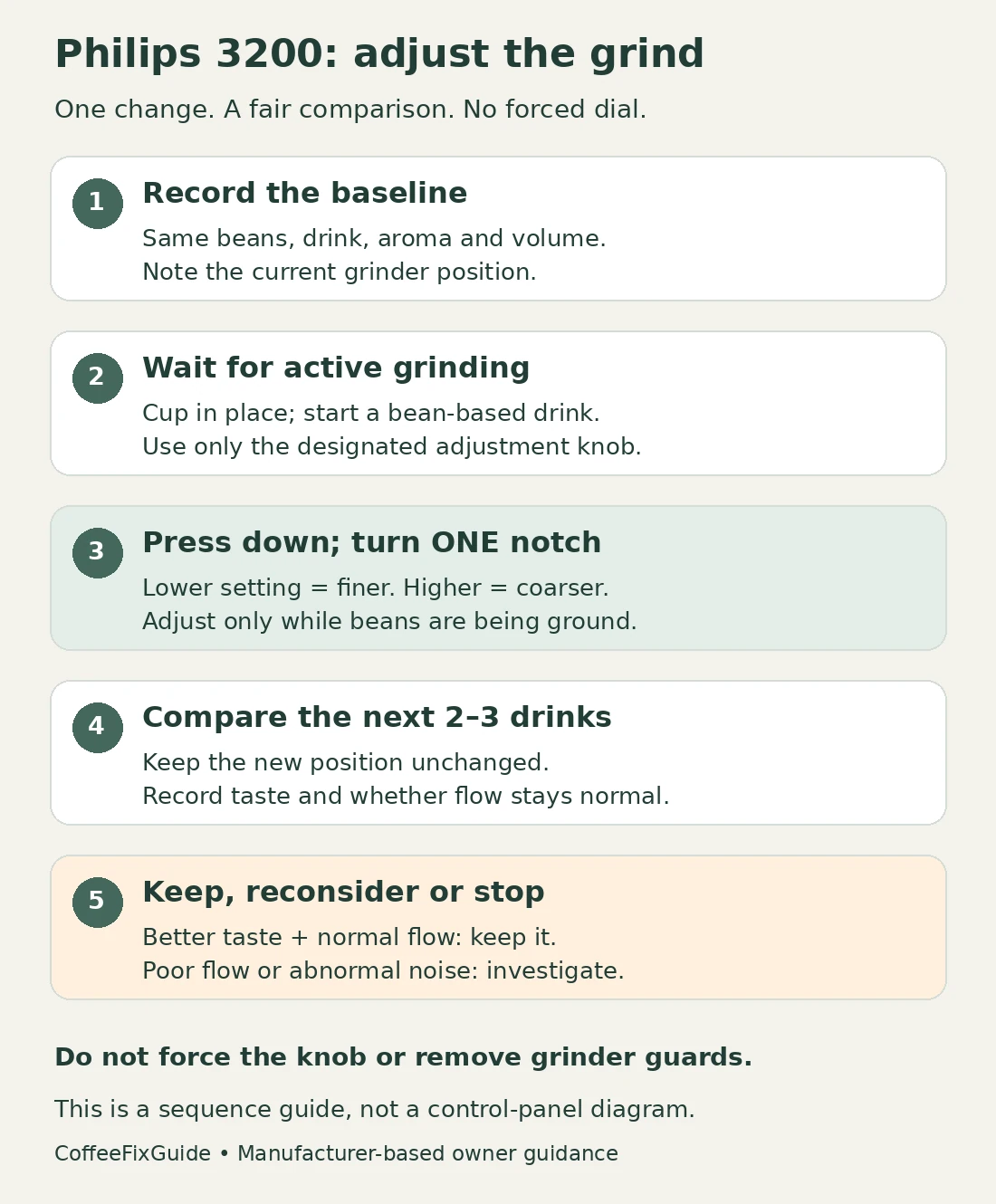
Quick answer: On a Philips 3200 LatteGo, change the grinder setting only while it is grinding beans. Press down the adjustment knob inside the bean hopper and move it just one notch. Lower settings give a finer grind; higher settings give a coarser grind. Brew two or three drinks before judging the change. Keep your beans, aroma strength and drink volume unchanged during that comparison. There is no single best number for every coffee. If the grinder stops, makes an abnormal noise or the machine stops dispensing, stop adjusting and investigate that symptom instead of forcing the dial.
Start with the setting you already have
Before touching the dial, write down its current position. A photo taken while the machine is idle can help you return to that position later. Do not remove guards or reach into the grinder to find a number.
This guide covers the 12-step grinder on Philips 3200 EP32xx machines, including LatteGo variants. Check your full EP number against the manufacturer’s support page if the controls differ. LatteGo describes the milk system; it is not a separate grind adjustment.
For a new machine, resist changing everything after the first disappointing cup. Philips notes that initial coffees can be watery while the machine settles into use. Follow the initial-use guidance in your supplied manual before fine-tuning. For an established machine, the useful starting point is the last setting that produced a drink you liked.
Grind, aroma and cup volume do different jobs
| Control | What you change | How to compare |
|---|---|---|
| Grinder knob in the bean hopper | The size of the ground coffee particles. | Keep aroma and volume fixed while comparing a grind change. |
| Aroma strength on the front panel | The selected coffee-strength level. | Keep the grinder and drink size fixed while comparing strength. |
| Drink quantity on the front panel | The selected amount of beverage. | Compare the same recipe at a different volume, without also changing grind. |
A large cup that tastes thin is not automatically a grinder problem. Start by noting the drink name and selected volume: “coffee on the largest setting” and “espresso on the smallest setting” are different recipes. If weak coffee is the main complaint, use the Philips 3200 watery-coffee guide for the broader checks.
Make one controlled adjustment
Have ready: your normal beans, a cup large enough for the chosen drink, and a note of the starting settings. No replacement part is needed. Do not use pliers or an improvised lever on the adjustment knob.
- Choose a repeatable drink. Use black coffee or espresso in bean mode, without milk for this comparison. Keep the same aroma and quantity selections.
- Prepare access to the knob. Open the bean-hopper lid and identify the designated adjustment control before starting. Keep hands away from the bean-feed opening and moving parts.
- Start the drink. Place the cup under the spout and begin brewing. Wait for the actual grinding phase, not just a lit power button or the later water-pumping phase.
- Press down and move one notch. Philips specifies counterclockwise for finer and clockwise for coarser. Check the markings on your machine: lower means finer, higher means coarser. Do not sweep across several positions.
- Release the knob and close the lid. Let the drink finish. Keep the new position unchanged for the next two or three drinks before assessing the result.
If grinding ends before you have made the adjustment, leave the control alone until another normal grinding cycle. There is no reason to rush or force it while the grinder is stationary.
Read the result, not just the number
The following is a comparison method, not a factory recipe or a diagnosis based on taste alone.
- Thin coffee with otherwise normal dispensing: first confirm that drink volume and aroma suit the drink you want. If you decide to try a finer grind, make only the single-step change described above.
- The next drinks taste better and dispense normally: keep that setting. You do not need to continue toward the finest end of the scale.
- Flow becomes much slower after going finer: do not make another finer adjustment. Return one step coarser during a normal grinding phase if the machine is operating normally. If dispensing remains restricted, switch to the water-flow checks.
- The taste changes but not in a useful way: return to your recorded baseline using the same one-notch procedure. Reconsider the beans or drink recipe before making a chain of adjustments.
A simple record is enough: bean name, drink, aroma level, quantity, dial position, and “better / worse / unchanged.” Compare drinks under similar conditions. A cup with cold milk added is not a useful direct comparison with the previous black espresso.
When turning the dial is the wrong fix
If the grinder runs but grounds do not reach the brew group, follow the blocked coffee-funnel guide. If the machine discards dry powder, check pre-ground mode and discarded-powder symptoms. Neither problem is solved by blindly choosing the finest setting.
A dirty brew group can affect flow and taste; changing the dial does not clean it. Follow the manufacturer’s rinse instructions and the separate brew-group lubrication guide when that maintenance is due. Switch off normally and wait for the machine to finish before removing the brew group.
Stop if the adjustment knob will not move using the documented method. Do not force it, dismantle the hopper or run repeated cycles through an abnormal grinding noise. Record the model number and what happened before the problem, then contact Philips. Water near electrical parts, a burning smell or damaged wiring also calls for stopping use and disconnecting power only when safe.
Common questions
What is the best grinder setting for Philips 3200 espresso?
There is no universal number in this guide. A setting copied from someone using different beans, aroma and volume may not suit your drink. Use your present setting as a baseline and retain a change only when the coffee improves without a flow problem.
Can I turn it straight to the finest setting?
No. The manufacturer limits each adjustment to one notch during grinding. Finer is not automatically better, and poor flow is a reason to stop going finer.
Why did the first cup taste the same?
Philips says to allow two or three drinks before evaluating the full change. Moving the knob again after every cup makes the comparison difficult to interpret.
Will this change coffee made from pre-ground powder?
No. The hopper grinder does not grind coffee that you put into the separate pre-ground compartment. Check the powder, dose and selected mode for that preparation method.
Sources and model help
This is a documentation-based guide with a suggested comparison routine, not a claim of hands-on testing. The cover shows representative equipment; the diagram explains the sequence rather than reproducing a machine control panel.
- Philips: adjusting the grinder setting — timing, direction, one-notch limit and comparison interval.
- Philips: watery coffee — initial use, settings, excessive fineness and maintenance.
- Philips EP3246/74 support and documentation — model-specific support.
Return to the Philips 3200 LatteGo model page for related symptoms and maintenance guides.