Quick answer: If your Philips 3200 LatteGo produces no hot water as well as no coffee, first fill and firmly seat the water tank. If the pump sounds louder than usual or you have just installed an AquaClean filter, switch the machine off, remove the filter, refill and reseat the tank, then start the hot-water function. Philips recommends dispensing two to three cups once flow is restored to clear trapped air. Prepare the AquaClean filter before putting it back. If hot water flows normally but coffee does not, the water supply is working; check the coffee path instead.
This guide covers the Philips 3200 LatteGo EP32xx family and its water flow symptom. Buttons and the hot-water outlet differ across revisions; use the manual for the complete EP model on your label. The cover is a generic illustration, not a photograph of a Philips machine.
One test separates two different faults
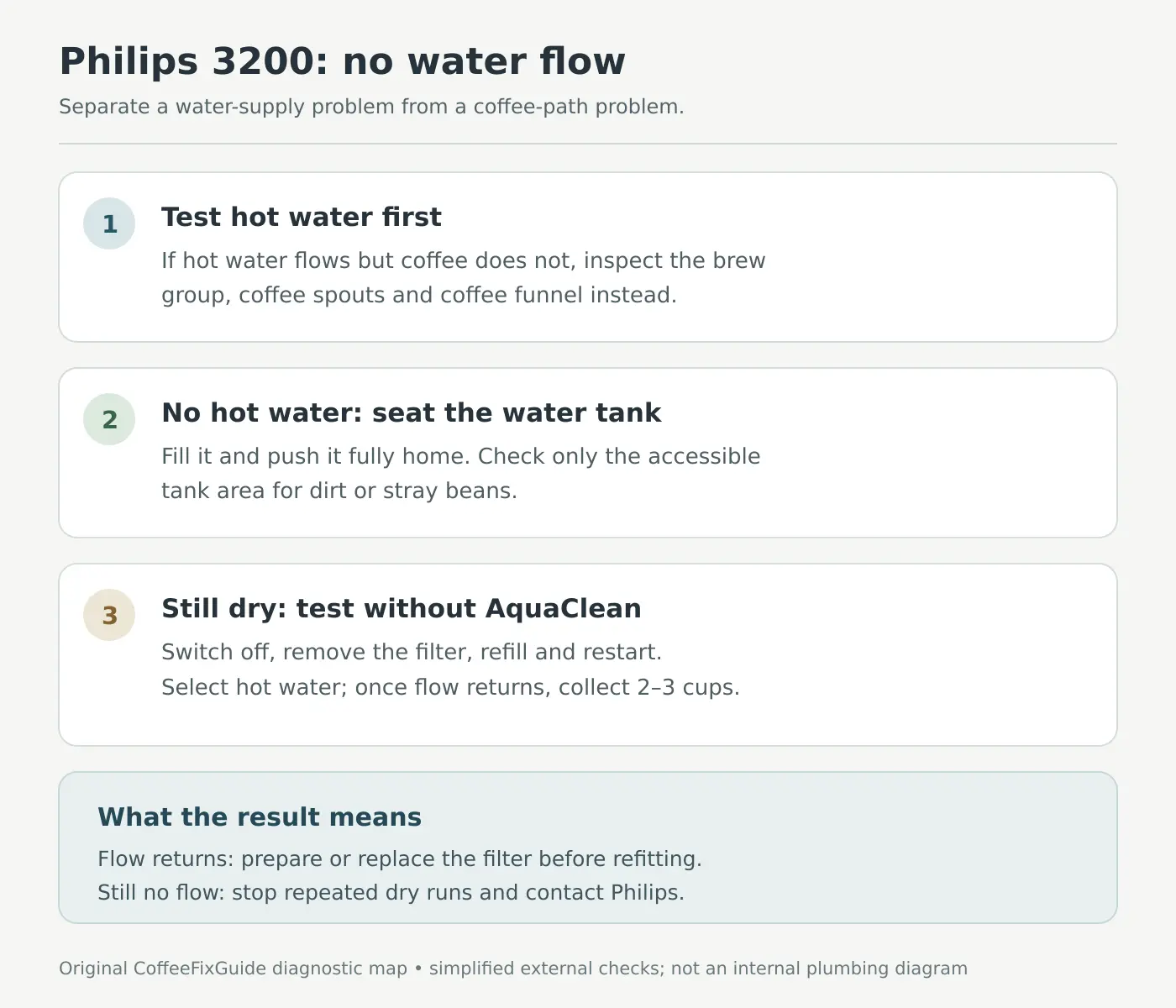
| Observation | What it tells you | Next step |
|---|---|---|
| Hot water and coffee both fail, perhaps with a louder pump | Water may not be entering the circuit; an air lock, unseated tank or filter can be involved. | Check the tank and perform the filter-out hot-water test below. |
| Hot water flows, but coffee does not | The machine can draw and dispense water through the hot-water path. This does not prove every coffee-path component is clear. | Check brew group, coffee outlets and coffee funnel according to the actual symptom. |
| No water after correct tank seating and a filter-out test | The basic external checks have not isolated the fault. | Note warning lights or E05, stop repeated dry attempts and ask Philips for service advice. |
Safety: Keep hands away from hot outlets and place a heat-safe cup under the correct spout. If the machine leaks onto the mains lead, plug or socket, switch off and disconnect power only when safe. Do not open the case or reach inside a powered machine. For this diagnosis you need fresh water, a cup or bowl and a dry cloth; no screwdriver or replacement pump is required.
1. Check the tank before touching the filter
Remove the tank and fill it with fresh water to an appropriate level below its MAX mark. Inspect the outside for cracks and wipe it dry. Slide the tank fully back until it is seated as described by your model manual. Philips specifically warns that a partly inserted front tank can prevent water from being drawn. Look only in the accessible tank area for a stray coffee bean or debris preventing full insertion; do not push tools into the machine-side intake.
Now select hot water with a cup beneath its outlet. Wait for the machine’s normal warm-up to finish. A brief interruption during first setup is different from continuous dry running. If hot water appears, observe whether the flow becomes steady. If water still does not flow, move to the filter test rather than making repeated coffees.
2. Test with AquaClean temporarily removed
Philips says trapped air can block the water supply, especially when the pump is unusually loud. Its support procedure is a controlled way to separate this from an AquaClean installation problem:
- Switch the Philips 3200 off and let it finish its shutdown. Remove the water tank and take out the AquaClean or other installed water filter. This is a temporary diagnostic test; keep the filter clean and note its age.
- Refill the tank with fresh water and push it fully back into place without the filter.
- Switch the machine on. Once it has heated, select the hot-water function and place a heat-safe cup under the outlet.
- If the water begins to flow, follow Philips’ instruction to dispense two to three cups of hot water. Do not treat a few initial sputters as proof of a broken pump when flow then stabilizes.
- If the machine remains dry, stop after the controlled attempt. Note whether the pump ran, whether the water level in the tank changed, and which warning lights or E05 message appeared. Contact Philips rather than repeatedly running the pump dry.
Water returning with the filter removed points toward a filter preparation or obstruction issue; it does not prove the machine has no other fault. A complete lack of flow after removal does not, by itself, identify a pump, valve or control board as the failed part.
3. Prepare and refit the AquaClean filter
For an AquaClean filter you plan to reuse, Philips instructs you to shake it for about five seconds and hold it upside down in a bowl of water until air bubbles stop escaping. Refit it in the filled tank, follow the activation instructions for your EP32xx panel, restart as directed by the manual and dispense another two to three cups of hot water. Our Philips 3200 AquaClean light guide explains the reminder and setup sequence.
If flow disappears as soon as the filter is fitted again, do not keep repeating the same attempt. Check that it is the correct filter and is fitted according to the manual. Philips says an AquaClean filter used longer than three months may be clogged and may need replacing. Match the filter to your machine and follow the activation procedure after installing a new one; avoid buying internal parts on the evidence of the light alone.
4. Hot water works, but coffee still does not
That is a different diagnostic branch. Philips lists a dirty brew group, blocked coffee dispensing spout, overfilled pre-ground compartment and clogged coffee funnel among possible reasons for no coffee output. Observe the grinder and where the water goes during one controlled coffee attempt; if water collects in the tray or leaks outside, stop if unsafe. A funnel blockage is especially relevant when the grinder runs but grounds do not reach the brew group. Our Philips 3200 blocked-funnel guide covers that specific check.
If the machine only produces a few drops on its very first uses, Philips notes that this can happen at first setup and may improve over subsequent cups. That does not justify repeated cycles when the pump is loud and hot water also fails. Let the separate hot-water test determine which route you follow.
When descaling or service makes sense
Scale can interfere with delivery, and Philips recommends using the machine’s programmed descale procedure when its indicator requests it. Follow the Philips 3200 descaling guide only after the machine can reliably draw and dispense water; pouring descaler into a dry, unprimed machine is not a useful first test. If the Calc/Clean light is stuck after a cycle, see the separate rinse-completion diagnosis.
Arrange support if the tank is seated, the filter has been removed for a controlled test and hot water still will not come out; if an E05 warning persists; if the pump sounds strained; or if water escapes onto electrical parts. Provide the complete EP model, filter age, whether the test was run with the filter out, the result of the hot-water test and a photo of the panel. Do not bypass an interlock or open the housing to guess at internal hoses.
Frequently asked questions
Should I replace the pump if the Philips 3200 makes a loud noise but no water flows?
No. Philips identifies trapped air as one possible explanation for loud operation without water. Seat the tank and perform the temporary filter-out hot-water procedure first. If it remains dry, support can diagnose the next step.
Can I use the machine without AquaClean to test water flow?
Yes, temporarily for the Philips troubleshooting procedure described above. Prepare and reactivate the filter before returning to regular filtered use, or replace it if it is due and has become obstructed.
Does no coffee mean no water flow?
Not necessarily. If hot water flows normally, check the coffee-only path: brew group, outlets, pre-ground dose and funnel. Do not conflate these with a tank or priming problem.
Is E05 the only no-water symptom?
No. Philips associates E05 with air trapped in the water circuit, but a tank that is not seated or a filter issue can also interrupt flow. Note the actual indicator on your machine; absence of E05 is not a clean bill of health.
Official sources and related pages
- Philips: no water flow from the tank — seating, trapped air, filter preparation and hot-water purge.
- Philips: error E05 and air in the circuit.
- Philips 3200 EP3246/74 support — model documentation and related troubleshooting.
- Philips 3200 troubleshooting hub · Coffee funnel blockage · AquaClean light.
Manufacturer instructions checked September 27, 2026. This original diagram summarizes external checks. Match water-outlet and button positions to your exact EP32xx manual.