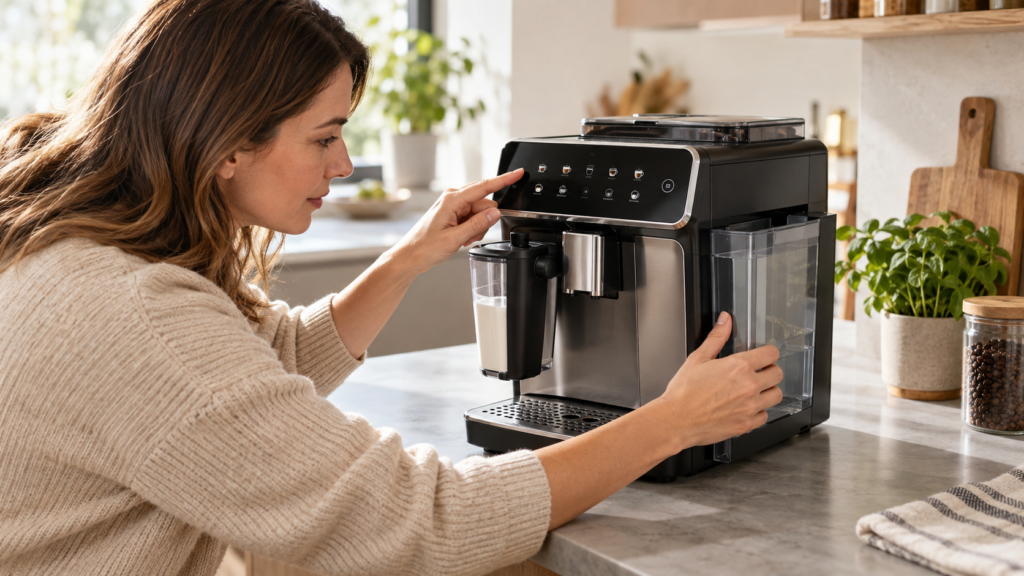
If your Philips 3200 LatteGo is not making coffee, shows warning lights, produces weak drinks or stops during startup, the problem is often caused by a component that is empty, full, blocked or incorrectly installed. Most faults can be narrowed down without opening the machine or replacing parts.
This Philips 3200 LatteGo troubleshooting guide covers the most common symptoms and shows you which checks to perform first. Button layouts and indicator combinations can vary slightly between EP32xx models, so use the model number printed inside the service door when consulting the official manual.
Quick answer: Fill and firmly reinstall the water tank, empty the coffee grounds container while the machine is switched on, check that the service door and drip tray are closed, and restart the machine. If coffee still does not flow, test the hot-water function. That single test helps separate a coffee-path problem from a general water-flow problem.
Philips 3200 will not turn on
If the entire control panel stays dark, check the external power path before the coffee or water systems: the rear cord connection, the main switch if your version has one, and another working wall outlet. See the dedicated Philips 3200 LatteGo won’t turn on guide for the order and electrical stop conditions. A lit warning icon calls for the symptom-specific checks below.
Philips 3200 quick troubleshooting checklist
- Switch the machine off using its power button.
- Wait until all internal movement has stopped.
- Remove, fill and firmly reinstall the water tank.
- Empty the drip tray and coffee grounds container.
- Confirm that the service door is completely closed.
- Check that the bean hopper contains dry coffee beans.
- Remove and rinse the brew group if it can be removed normally.
- Reinstall the brew group, drip tray and grounds container.
- Turn the machine on and allow the automatic rinse to finish.
- Run hot water before attempting another coffee.
Do not force the brew group out. If it appears locked, reinstall the grounds container and drip tray, close the service door, switch the machine on and then off, and wait until it becomes completely quiet. The internal mechanism must return to its parked position before the brew group can be removed.
Philips 3200 problem diagnosis table
| Symptom | Most likely cause | First check |
|---|---|---|
| No coffee comes out | Air in the water circuit, blocked coffee path or brew group problem | Run hot water and compare the flow |
| Machine makes noise but no water flows | Water tank not seated, air lock or AquaClean filter issue | Remove the filter and test without it |
| Coffee is weak or watery | New machine adjustment, coarse grind or low aroma setting | Brew five cups before changing multiple settings |
| Only a few drops come out | Fine grind, blocked spout or scale buildup | Test hot water and clean the dispensing spout |
| Grinder runs but no coffee is dispensed | Empty hopper, oily beans or blocked coffee funnel | Inspect the hopper and pre-ground coffee funnel |
| LatteGo produces little or no foam | Milk system assembled incorrectly or milk is too warm | Reassemble both LatteGo parts and use cold milk |
| Warning light remains on | A removable component is missing, full or incorrectly installed | Check the symbol before resetting anything |
| Water underneath the machine | Full drip tray, displaced tank or internal leak | Dry the counter and identify where fresh water appears |
Philips 3200 does not dispense coffee
Start by determining whether the problem affects only coffee or the complete water circuit.
Test the hot-water function
Place a container under the hot-water outlet and select hot water. A strong, continuous stream means the pump and main water path are operating. The fault is then more likely to involve the grinder, coffee funnel, brew group or dispensing spout.
If hot water also fails to flow, inspect the water tank, tank valve, AquaClean filter and possible air in the circuit before working on the coffee path.
Check the brew group
Switch the machine off with its power button and wait until it has stopped making noise. Open the service door, remove the drip tray and grounds container, and remove the brew group only if it releases normally.
Rinse the brew group thoroughly with lukewarm water. Pay particular attention to the filter screen and moving channels where compacted coffee can restrict flow. Do not use washing-up liquid or place the brew group in a dishwasher unless the manual for your exact model explicitly permits it.
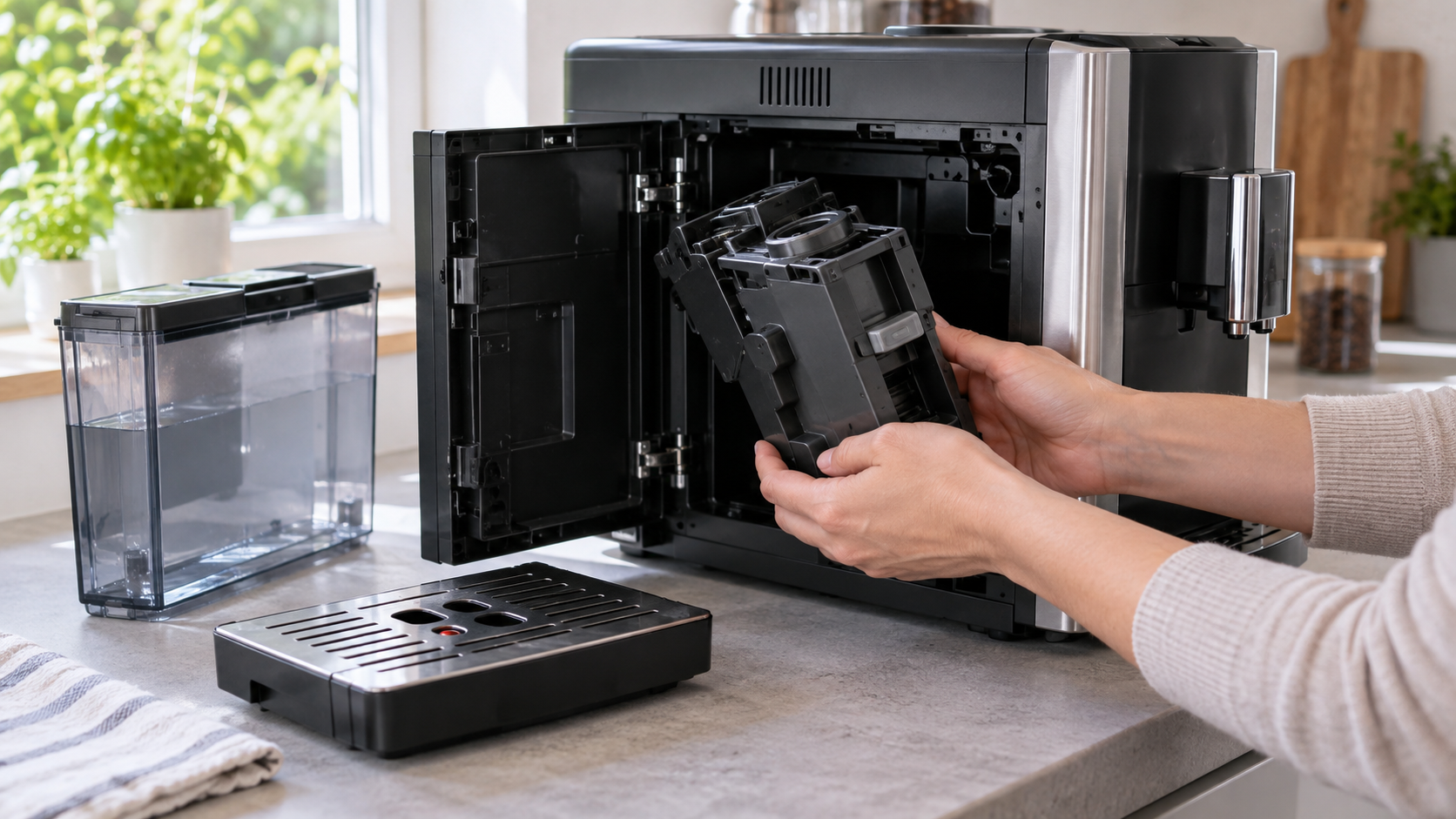
Allow excess water to drain, reinstall the brew group and make sure it clicks into position. Close the service door completely before restarting the machine.
Inspect the coffee dispensing spout
Dried coffee residue can partially block one or both outlets. Clean the visible openings with a soft brush or the cleaning tool recommended for the machine. Avoid pushing sharp metal objects deep into the spout because they can damage internal parts.
Check the pre-ground coffee funnel
With the machine switched off and the bean hopper empty enough to work safely, inspect the pre-ground coffee funnel for compacted grounds. Use the handle of the supplied measuring spoon or another non-sharp tool to loosen dry coffee gently. Never pour water into the funnel.
If you can hear the grinder but little or no ground coffee reaches the brew group, follow our Philips 3200 blocked coffee funnel guide for a focused diagnosis and safe clearing steps.
Philips 3200 is not pumping water
A loud pumping or vibrating sound with little water usually means that the machine cannot draw water from the tank.
Reseat the water tank
Fill the tank with fresh water and slide it fully into position. Check that no coffee beans or debris are preventing it from sitting correctly. Inspect the tank outlet for dirt, but do not press or dismantle its valve while the tank is full.
Remove the AquaClean filter temporarily
An incorrectly prepared or air-filled AquaClean filter can restrict flow. Remove the filter, refill the tank and test the hot-water function without it.
If normal flow returns, prepare the filter according to its instructions before reinstalling it. The filter should be shaken, immersed and allowed to release trapped air as directed by Philips. After installation, dispense hot water to fill the water circuit.
Prime the water circuit
- Fill the water tank.
- Remove the AquaClean filter during the initial test.
- Place a large container under the hot-water outlet.
- Select hot water.
- Allow the machine to dispense until the flow becomes steady.
- Stop if the pump becomes unusually loud or no water appears after repeated attempts.
If the tank is seated correctly and the machine cannot dispense either hot water or coffee, follow our Philips 3200 no-water diagnostic guide for a controlled filter-out and hot-water test before requesting service. Persistent failure after those checks needs Philips support; a dry outlet alone does not identify an internal part.
Philips 3200 coffee is weak or watery
Watery coffee does not always indicate a defect. A new machine and newly installed brew group need several brewing cycles before the coffee puck, grinder dosing and internal adjustment become consistent.
Make one adjustment at a time
- Increase the aroma strength before changing the grinder.
- Use fresh, dry beans rather than very oily or heavily flavored beans.
- Reduce the selected drink volume if the cup is being over-diluted.
- Allow several cups after changing beans or grind settings.
- Adjust the grinder only one notch at a time.
The grinder adjustment knob should generally be changed while the grinder is actively running. Turning it several positions while stationary can place unnecessary stress on the adjustment mechanism. A finer setting slows extraction, while a coarser setting increases flow.
Do not judge the result from the first cup after an adjustment. The grinder contains retained coffee, so the full effect may take two or three drinks to appear.
Philips 3200 grinder is not working
If the machine requests coffee but the grinder remains silent, first verify that a coffee drink—not hot water or pre-ground mode—has been selected.
Check the beans
Remove any foreign material and confirm that beans can move toward the grinder inlet. Very oily beans can stick together and form a bridge above the opening even when the hopper appears full.
Stir the beans gently with the machine off. Do not place fingers or tools into the grinder opening.
Check for an overheated grinder
Repeated brewing can cause the grinder or machine to pause temporarily. Switch the machine off and allow it to cool. If the grinder repeatedly stops, makes harsh mechanical noises or trips the machine, stop using it and arrange service.
Do not dismantle the grinder from above
The top adjustment knob is intended for grind adjustment, not grinder removal. Internal grinder work can expose moving components and electrical connections. It should be handled by a qualified technician.
Philips 3200 LatteGo is not frothing milk
First note whether no milk dispenses, milk arrives with thin foam, or milk leaks from the detachable LatteGo. Philips recommends cleaning the two LatteGo parts after each use, using enough cold refrigerated milk, and trying a milk type suitable for foaming. Reassemble the two parts until they click. For a symptom-by-symptom test and service stop points, follow our Philips 3200 LatteGo milk frother guide.
Philips 3200 warning lights
Do not reset the machine before identifying the illuminated symbol. A warning indicator usually points to a removable component or maintenance condition rather than an electronic failure.
| Indicator | What it commonly means | What to do |
|---|---|---|
| Water tank symbol | The tank is empty, missing or not seated correctly | Fill and firmly reinstall the tank |
| Coffee grounds symbol | The grounds container is full or was emptied while the machine was off | Empty and reinstall it while the machine is switched on |
| Warning triangle | Service door, brew group, drip tray or another component needs attention | Check every removable component and restart normally |
| AquaClean indicator | The filter requires activation or replacement | Prepare and activate the correct filter |
| Calc/Clean indicator | A descaling cycle is required or incomplete | Complete the model-specific descaling sequence |
| Multiple lights flashing | Startup fault, incorrectly installed brew group or interrupted procedure | Switch off, reinstall components and consult the exact model manual |
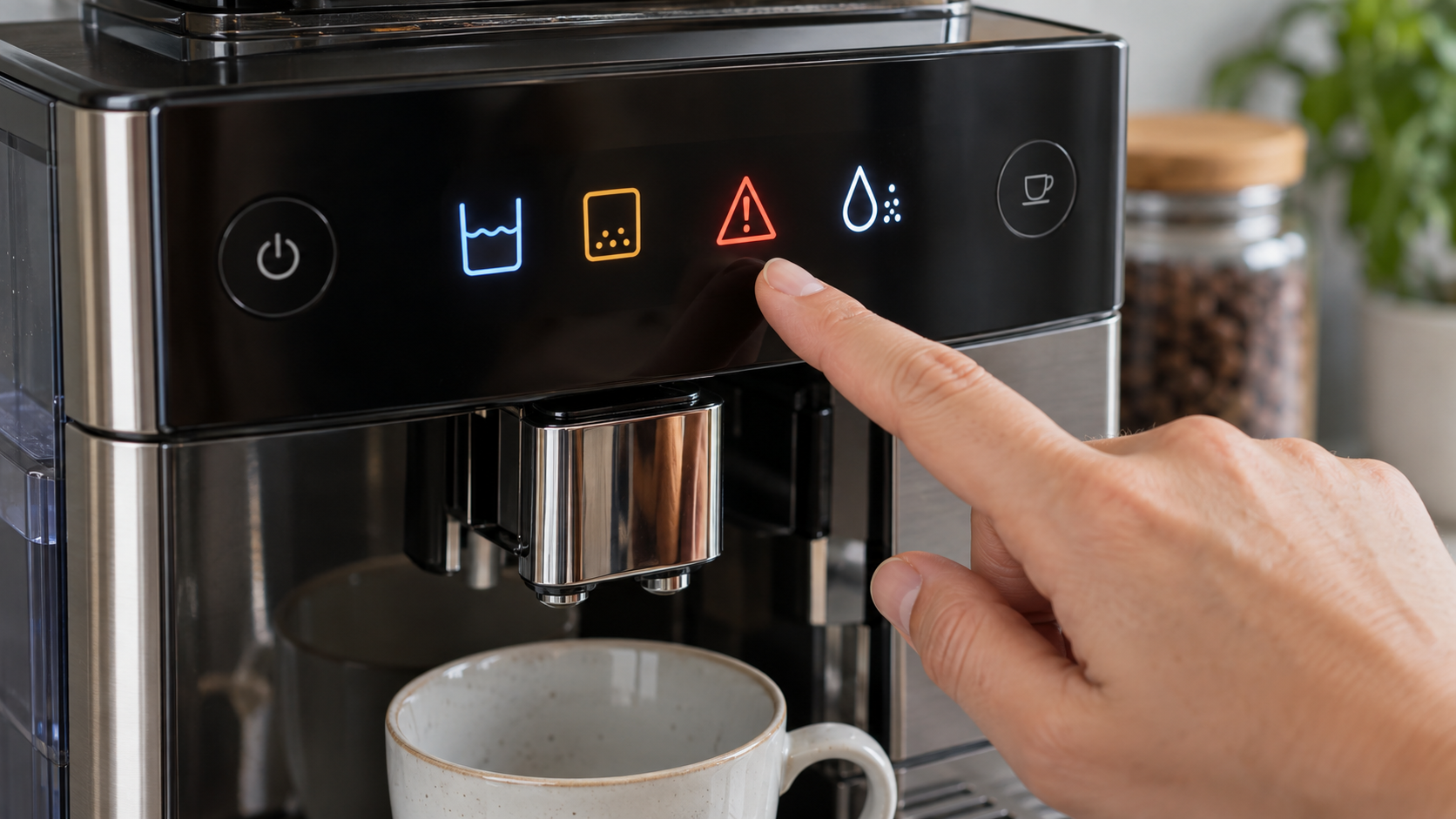
The appearance and combination of indicators can vary across Philips 3200 versions. Match the lights on your panel with the instructions for the full model number rather than relying only on the “3200” series name.
Coffee grounds container light stays on
The machine counts coffee pucks electronically. If the container is emptied while the machine is off, the counter may not reset.
- Switch the machine on.
- Wait until startup has finished.
- Remove the drip tray and grounds container.
- Empty and clean the container.
- Wait approximately five seconds.
- Reinstall the container and drip tray completely.
Use the focused Philips 3200 grounds-container warning guide for the exact on-state reset sequence and to distinguish the grounds symbol from a steady or flashing general alarm. Refit the container and tray fully; contact Philips if the correct grounds light persists after the sequence.
Philips 3200 is leaking water
Some water in the drip tray is normal: Philips says internal rinsing drains into it. Before any cycle, stop if water reaches the plug or outlet. Use our Philips 3200 LatteGo leak-location guide to distinguish a normal wet tray from clear water beside the tank and brown marks left after tray removal.
Find the source before moving the machine
- Empty and dry the drip tray.
- Dry the counter beneath the machine.
- Fill and reinstall the water tank.
- Run one rinse or hot-water cycle.
- Observe where the first fresh water appears.
Water at the front usually comes from an overflowing drip tray, a displaced tray or liquid missing the cup. Water appearing directly beneath the tank can indicate that the tank is not seated properly or that its valve or seal is damaged.
Unplug the machine and stop using it if water emerges from inside the casing, reaches the power cord or continues leaking while the machine is switched off.
Philips 3200 brew group is stuck
First distinguish a group that will not come out from one that will not go back in. Philips gives different steps for these two situations. If the group remains inside, leave it in place, refit the drip tray and grounds container, close the door, then switch the machine off and wait until it is quiet. Switch it on and wait until it is fully ready before trying the PUSH release gently. Never remove the group during descaling.
For the separate insertion sequence, neutral-position marks and service stop points, see our Philips 3200 LatteGo brew group stuck guide. Do not force the handle or rails.
Philips 3200 coffee is not hot enough
Compare a plain coffee in a preheated cup with a milk drink, then check the coffee-temperature setting shown in the manual for your exact EP model. If the drink remains cool or hot water also seems cool, follow the separate Philips 3200 LatteGo coffee temperature guide before considering service. A cool milk drink by itself does not identify a failed heater.
When descaling may solve the problem
Descaling may be appropriate when water flow has gradually weakened, drink temperature has fallen, the machine has become noisier during pumping or the Calc/Clean indicator is illuminated.
Descaling is not the correct first response to every fault. It will not clear a bean obstruction, repair a damaged grinder, reinstall a brew group or fix an incorrectly assembled LatteGo container.
Use a descaler approved for automatic espresso machines and follow the complete sequence for your model. Do not interrupt the procedure after the descaling solution has entered the water circuit.
When to stop troubleshooting
Disconnect the machine and seek qualified service when:
- water leaks from inside the casing or near electrical components;
- the grinder produces scraping, cracking or repeated mechanical knocking;
- the machine repeatedly trips its power supply;
- there is a burning smell, smoke or visible heat damage;
- the pump remains unusually loud and cannot draw water;
- the brew group drive mechanism repeatedly jams;
- the same warning returns after all removable parts are correctly installed.
Do not remove the outer casing unless you are trained to service mains-powered appliances. The machine contains electrical components, hot surfaces and pressurized water lines.
How to prevent recurring Philips 3200 problems
- Empty the drip tray and grounds container regularly.
- Rinse the brew group weekly and allow it to air-dry.
- Clean the LatteGo system after milk drinks.
- Use fresh water and replace the AquaClean filter when required.
- Descale when prompted using the complete procedure.
- Keep the bean hopper dry and avoid extremely oily beans.
- Clean the coffee spouts before residue hardens.
- Lubricate the brew group only at the intervals and points specified by Philips.
You can find more model-specific maintenance and repair instructions in the CoffeeFixGuide repair guide database.
Frequently asked questions
Why is my Philips 3200 on but not making coffee?
The water tank or brew group may be incorrectly installed, the coffee funnel may be blocked, or the water circuit may contain air. Test hot water first, then inspect the brew group and coffee path.
Why does my Philips 3200 make a loud noise but no water comes out?
The pump may be drawing air because the tank is empty, incorrectly seated or restricted by an unprimed AquaClean filter. Remove the filter temporarily and run hot water to prime the circuit.
Why is my Philips LatteGo not producing foam?
The two LatteGo parts may not be locked together, a milk or air channel may be blocked, or the milk may be too warm. Disassemble, rinse, reassemble and test with cold milk.
Is water in the Philips 3200 drip tray normal?
Yes. The machine directs automatic rinse water and internal pressure-release water into the drip tray. Rapid overflow or water appearing underneath the casing is not normal.
Can I remove the Philips 3200 brew group while the machine is on?
No. Switch the machine off with its power button and wait until all internal movement stops. Removing or forcing the brew group at the wrong time can damage its mechanism.
Can I use vinegar to descale a Philips 3200?
Use a descaling product approved for automatic espresso machines and follow the instructions for the exact model. Household vinegar can leave odor and may not provide the concentration or material compatibility specified by the manufacturer.
Why does the coffee grounds light stay on after I empty the container?
The container may have been emptied while the machine was off. Empty it again while the machine is switched on, wait several seconds and reinstall it fully.
Official Philips support
Indicator patterns and procedures can differ between EP32xx variants. Confirm the full model number and use the corresponding documentation on the official Philips 3200 support page.
Last verified: September 19, 2026. CoffeeFixGuide is an independent troubleshooting resource and is not affiliated with Philips.